
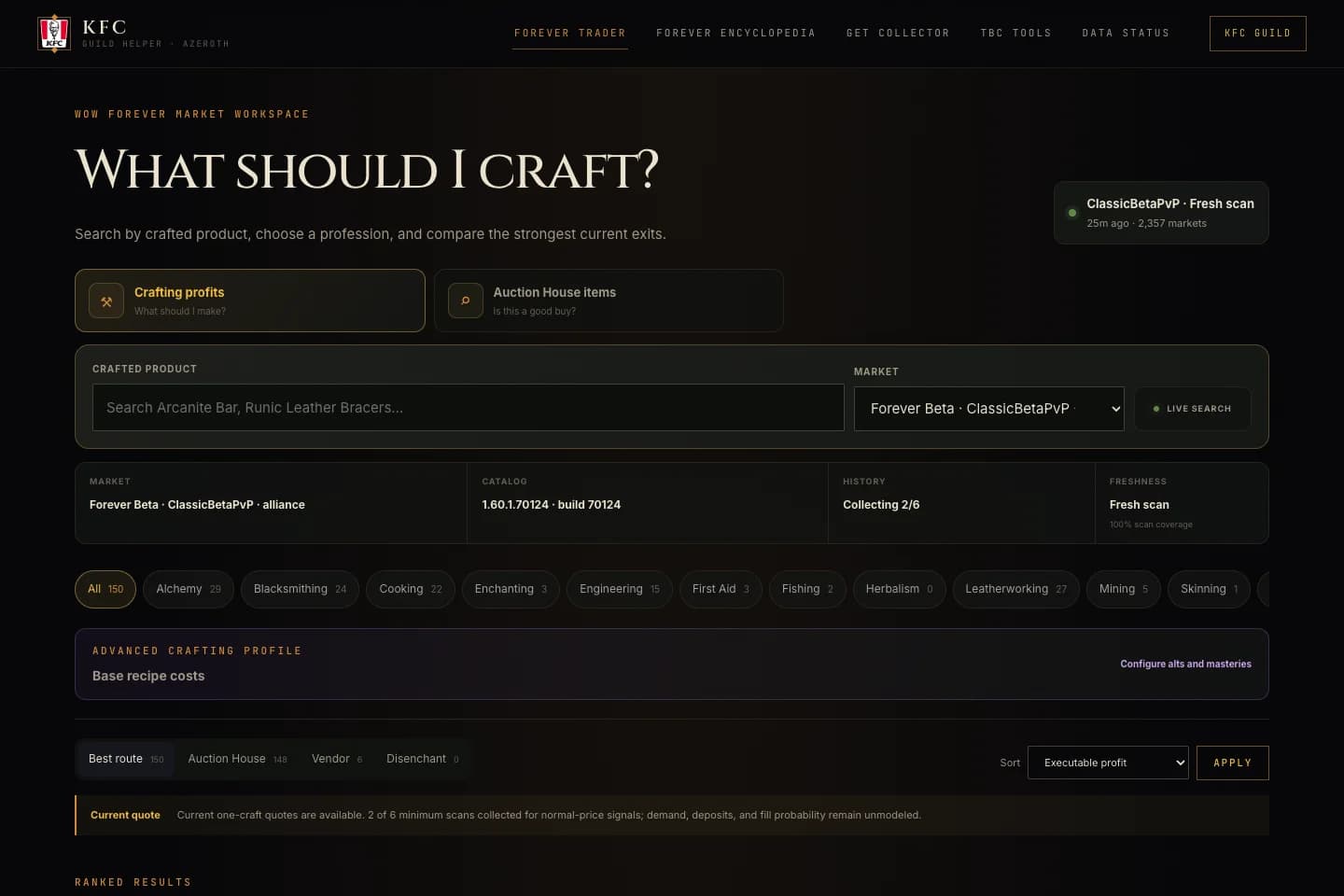
WoW Trader helps compare material costs and auction listings. It cannot guarantee that an item will sell, how soon a buyer will arrive or what price will remain when you reach the auction house. Start with the WoW Trader introduction if you have not used the Forever workspace before.
Workspace checked September 30, 2026. The interface and data can change. This article explains how to read the evidence shown by the tool, not which item to buy today.
Check the upload before the number
Prices update when someone uploads auction data from the app. This is a community contribution process, not a continuous official auction feed. Sometimes nobody uploads for a while. That gap is not evidence of a stable market.
Read the timestamp for the market you selected. A fresh upload in one dataset says nothing about another dataset's freshness. An old scan can help you understand a past observation, but it should not be treated as a current offer.
Do not install collection software just to browse prices. The public website is usable independently; the optional collector and desktop companion have their own controlled-test requirements.
Check which market and build you are reading
Use the Forever workspace rather than the separate TBC tools. Record the displayed market label, faction scope where shown, catalog build and scan age. A market identifier is a data label, not a realm you should tell your friends to choose.
If a recipe or item is missing, do not replace it with a similar-looking result from another version. Missing information is a reason to investigate the catalog and input data. It is not a zero price or confirmation that the recipe is unavailable in game.
An asking price is not a completed sale
A seller can list an item for a high amount without finding a buyer. The lowest visible listing is still an offer, not proof that someone recently paid it. A ranking based on those listings is useful for deciding what to inspect, not permission to spend all your gold.
History coverage matters separately from scan freshness. One recent observation may tell you what was listed at that moment, but not a normal price range. Respect collecting-history and speculative-ask labels instead of treating the absence of a warning as proof of demand.
A worked example with invented numbers
The following values are deliberately invented to demonstrate the arithmetic. They are not current game prices, an actual item recommendation or a statement of Blizzard's auction fees. Assume one crafted item uses inputs costing 8 gold in total, could sell for 12 gold, and incurs 1 gold of combined selling costs.
| Assumption | Amount |
|---|---|
| Material cost for one craft | 8 gold |
| Assumed completed sale | 12 gold |
| Assumed selling costs | 1 gold |
| Difference if every assumption holds | 3 gold |
The calculation is 12 - 8 - 1 = 3 gold. Now change only the sale assumption: at 9 gold, the difference is zero. If the item never sells, the 12-gold listing did not create income at all; your gold remains tied up in materials or stock, and repeat listing costs may worsen the result.
That is why a large displayed margin is a question to investigate. Ask whether you can buy the necessary inputs at the quoted cost, whether the output has buyers, and which costs or assumptions the estimate leaves out.
One craft is not twenty crafts
The cheapest material listing may cover only part of your batch. More units can require more expensive listings. A headline per-craft difference does not imply that multiplying by twenty preserves the same costs or sale price.
Inspect quantities and depth where available. Check whether a proposed route depends on buying more units than the visible supply covers. Include the time and risk of holding inventory in your own decision, even where the tool does not model them.
An estimated vendor or other exit also needs its own checks. Do not silently substitute an auction asking price for a guaranteed alternative. Read the route label and the input assumptions before comparing results.
Pause when the evidence is weak
Before acting, confirm:
- The intended game version, market and catalog build are selected.
- The most recent upload is recent enough for your use.
- Required materials have prices and sufficient quantities.
- You understand whether the output value is a listing, estimate or another exit.
- History and uncertainty labels are not being ignored.
- You have checked the actual auction house and can tolerate the item not selling.
Nothing on the public website requires you to buy an item to finish a test. Browser feedback is useful without a trade: can you find the age of the scan, recognize missing data and explain what a quote represents?
Return a reproducible finding
Use the market-quote assignment for an unclear label, broken interaction or mobile layout issue. Include the page, market, item, date, scan age, browser and what you expected.
A stale-data observation belongs in the report as context; it is not automatically a software defect. Do not post raw scan files, tokens or account information in public channels. Collection tests need prior coordination with the maintainer and a private diagnostic route.
For current tools and release boundaries, return to the addon and tools hub. The most useful community contribution is an accurate, limited observation, not an unsupported claim that a tool guarantees profit.
Written by WoW Forever Discord Team. About our organizers · Suggest an article correction in Discord